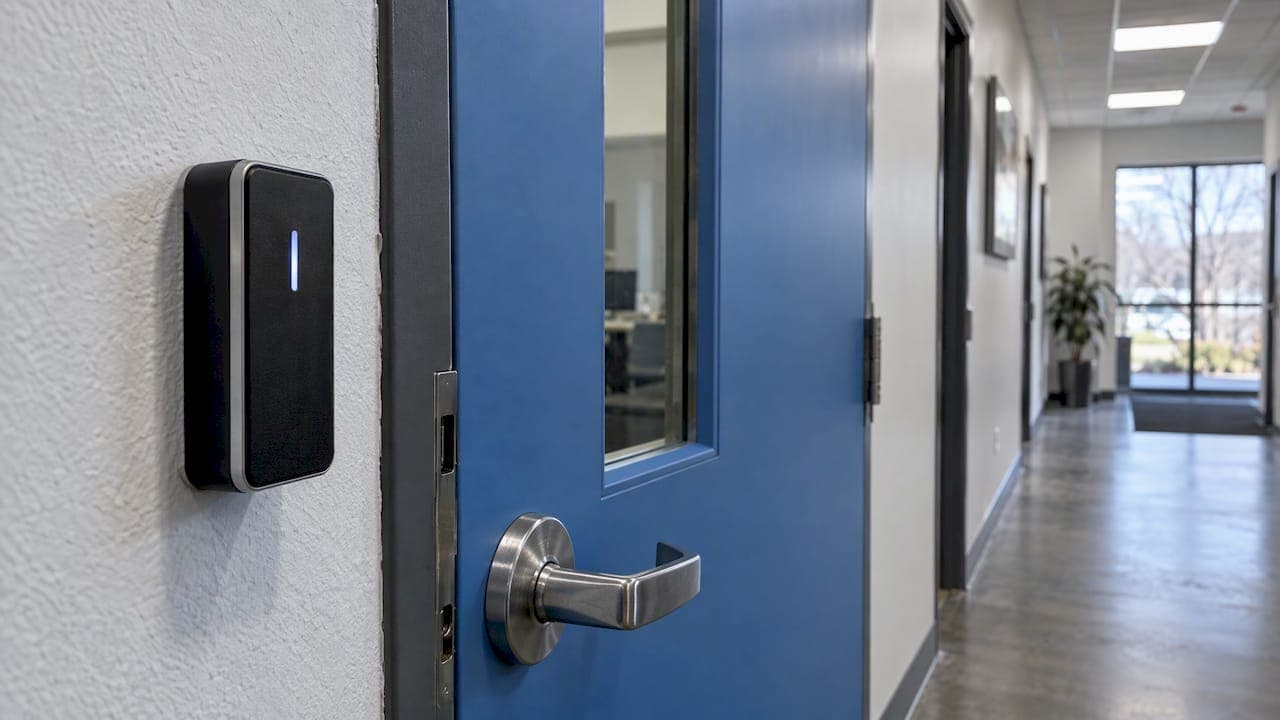
Cloud-based access control lets you manage who can open which door through a web portal or app, instead of a computer and software kept in your building. The readers, locks and door controllers are still fitted on site. What changes is where the permissions are stored and managed: on a hosted platform you reach from any internet-connected device. For many UK properties that makes life simpler. For others, a local system is the better fit. This guide helps you tell which one you are.
TL;DR
- A cloud system manages doors through a hosted online platform. You still need physical readers, electric locks and controllers at each door.
- You can add or remove a person's access in seconds from anywhere, which suits sites with frequent staff, volunteer or contractor changes.
- Expect an ongoing subscription rather than one large upfront cost, so ask what is charged per door, per user and per year.
- Security depends on the platform, the installation and how you manage permissions. Ask what happens during an internet or power failure before you sign.
- A site survey is the only reliable way to decide between cloud, on-site or a hybrid of both.
Table of Contents
- What "cloud-based" actually means
- How a cloud system controls entry to a building
- Cloud vs on-premise: the practical differences
- What you need to install one
- How secure is cloud-based access control?
- What happens if the internet or power goes down
- Costs and contract terms
- Which buildings suit a cloud system?
- Our perspective
- Talk to us about your doors
- Checklist before you decide
- FAQ
- Sources
What "cloud-based" actually means
The UK National Cyber Security Centre describes cloud services as on-demand, highly scalable services hosted on shared infrastructure and accessed over the internet. Applied to doors, that means the software that holds your user list, schedules and door settings runs on a provider's servers, not on a PC in your office cupboard.
In a traditional system, someone has to sit at that PC, or log in remotely, to change anything. The software needs updating, the machine needs backing up, and when the person who understood it leaves, the knowledge goes with them. A cloud platform moves those jobs to the provider. You get a login, a dashboard and usually a phone app.
The doors themselves are no different. A cloud system is not wireless magic. It is the same electric lock, the same reader and the same cabling you would find in any professionally installed system, connected to a different kind of management layer.
How a cloud system controls entry to a building
The day-to-day flow is straightforward:
- A person presents a credential at a reader: a fob, a card, a PIN, or a phone.
- The reader passes the credential to a door controller, a small unit that decides whether to release the lock.
- The controller checks its rules. These are the permissions you set in the cloud portal: who, which door, which days and hours.
- If the person is allowed, the lock releases, and the event is logged.
- The log syncs to the platform, where you can view it, search it, or receive alerts.
The important point is step three. Good cloud systems send the rules down to the controller, so it can make the decision itself rather than waiting for a reply from a server. That is why a brief internet drop should not leave people stuck outside. We come back to this below, because it is the question to put to any supplier.
When you change a permission, say you add a new teaching assistant or remove a departing contractor, the platform sends the update to the controllers at the doors. You do not need to be on site, and you do not need to collect the old fob to stop it working: you simply disable it.
Cloud vs on-premise: the practical differences
| Question | Cloud-based | On-premise (local server) |
|---|---|---|
| Where is the management software? | Hosted online by the provider | On a PC or server in your building |
| Managing users | From any device with a login | Usually from the machine it is installed on, or via remote access you set up |
| Software updates | Handled by the provider | Handled by you or your installer |
| Cost pattern | Lower upfront, recurring subscription | Higher upfront, fewer recurring fees |
| Multiple sites | Easy to manage under one login | Needs extra setup to link sites |
| Reliance on internet | Needed for remote management; doors should keep working locally | Works on your internal network |
| Data location | Held by the provider, so you must check where | Held on your own equipment |
| Best for | Sites with frequent changes, several buildings, limited IT support | Sites with strict data rules, poor connectivity or a preference for full control |
There is also a middle route. A hybrid system keeps a local controller or server and adds cloud access for remote management. For some buildings that is the sensible compromise, and a decent installer will talk you through all three rather than push one.
What you need to install one
A cloud system needs three things.

On-site hardware. Each controlled door needs a reader, an electric lock or release, and a door controller, plus a request-to-exit button or sensor on the inside, so people can leave. Doors also need to suit the lock. A fire door, for instance, has specific requirements, and a lock must release safely on a fire alarm. Your installer should assess every door for this.
Credentials. Most buildings use key fobs or cards. Others use PIN keypads, phone-based credentials or a mix. Fobs are simple and cheap to replace. Phones are convenient for staff but unsuitable for pupils, children's groups or visitors who will not install an app. Mixed credentials are common: fobs for staff, a keypad for a back door, an intercom for visitors.
A reliable network connection. The controllers need to reach the platform. That might mean a wired connection to your router, or a dedicated connection where your building's Wi-Fi is patchy. This is often the weak point in real installations, not the access control itself. We design the network side as part of the job, because a door system is only as dependable as the cabling and equipment connecting it. See our Wi-Fi and networking service for how that fits in.
How secure is cloud-based access control?
Security here has two halves: the platform, and how you run it.
On the platform, the NCSC's cloud guidance sets out what to look for. It says interfaces to a cloud service should be restricted to authenticated and authorised identities, with authentication carried out over secure channels. In practice, ask whether the portal supports multi-factor login, and whether the connection between controllers and the cloud is encrypted.
On how you run it, the same body recommends granular, least-privilege access and tools to review and remove permissions that are no longer used. For a door system that translates neatly:
- Give each person access only to the doors and hours they need.
- Limit how many people can administer the system, and give each their own login rather than a shared one.
- Review the user list on a regular schedule, and after every staffing change.
- Remove leavers the same day.
A surprising number of break-ins and incidents involve a credential that should have been cancelled months ago. A cloud portal makes that review quick, which is one of its real advantages. It only helps if someone actually does it.
Data protection
Access logs record who went where and when, which makes them personal data. The Information Commissioner's Office guidance on cloud computing says organisations should document their security controls and establish where the data is stored and who can access it. That guidance dates from 2012, so check the ICO's current pages too, but the principle holds. Before you sign, ask the provider where logs are held, how long they are kept and how you can export or delete them. Schools and nurseries, which hold records about children and staff, should be especially careful here.
What happens if the internet or power goes down
This is the question that separates a well-designed system from a badly designed one, and a supplier's answer tells you a lot.
Internet failure. In a well-designed system the controllers hold the current rules locally. People with valid credentials still get in and out; events are stored and uploaded when the connection returns. What you lose until then is remote management: you cannot add a new user from your phone. Ask the supplier to confirm this behaviour for the specific product, and ask how long a controller will keep working offline.
Power failure. Electric locks need power. Ask whether each door is fail-secure (stays locked) or fail-safe (releases), and why that choice suits that door. Escape routes must always allow people out. Battery backup keeps the system running for a limited time, and how long depends on the size of the system and the load, so ask for a figure for your installation rather than a general assurance.
Platform outage. The provider's servers can have problems too. Ask for a written statement of how quickly service is restored, and what the contract says if it is not. Informal reassurance is not enough.
A monitored intruder alarm and CCTV with remote monitoring face similar questions about connectivity, and the same answers apply: design for failure, and test it.
Costs and contract terms
Cloud access control usually moves spending away from a large upfront purchase and towards a recurring subscription. That helps cash flow, particularly for a nursery, a church or a small charity. It also means the total over five or ten years can be higher than a local system, depending on how fees are structured.
Before comparing quotes, ask each supplier the same questions:
- Is the fee per door, per user, per site, or a flat rate?
- What is included: software updates, support, data storage, the app?
- What is the minimum term, and what happens at renewal?
- If you leave, can you keep the hardware and move to another platform, or is it locked to that provider?
- Can you export your user list and logs?
That last pair matters most. Some systems are open enough that a different installer can take over; others tie you to one vendor for life. A clear fixed quotation that sets all of this out in plain terms is what you should expect.
Which buildings suit a cloud system?
Schools and nurseries
Staff, supply teachers, contractors and parents' helpers come and go. Being able to issue a temporary credential, restrict it to certain doors and hours, and cancel it immediately is a real safeguard. Cloud systems also make it easy to see who entered the building and when, which supports safeguarding checks. They pair naturally with an intercom at the entrance, so staff can see and speak to visitors before releasing the door. Our intercom systems are designed for exactly that front-door routine. If lockdown procedures matter to you, ask about integrating them with door control.

The caution is data. Children's movements and staff records should be handled in line with your data protection obligations, so check where the platform stores data before you commit.
Places of worship
Many churches, mosques, temples and community halls are run by volunteers, open at irregular hours, and shared by several groups. A cloud system lets a trustee or caretaker grant a hall hirer access for a single evening without handing over a key or travelling in. The log also gives you a record when something goes missing. These buildings often have thick walls and older wiring, so the network and door preparation need thought at survey stage.
Homes and residential blocks
For a single house, full access control is rarely needed; a good alarm, smart doorbell or intercom, and sensible locks usually do the job. Access control makes sense for multi-occupancy buildings, shared entrances, or larger homes with staff or a home office. Our home security services cover the options.
Offices, warehouses and commercial sites
Businesses with several sites, shift patterns or contractors benefit most. One login controls every location, and you can set doors to unlock automatically during working hours. Where a site has weak connectivity or strict data rules, a local or hybrid system may be better.
Our perspective
We install access control every week, and we are not wedded to any one model. The right system is the one that suits the building, the people using it and the person who has to manage it on a Monday morning.
Cloud management earns its place when the user list changes often and nobody on site is an IT person. We have seen too many systems where the software sat on an old PC that nobody could log in to, and the only way to remove a leaver was to change the locks. Remote control fixes that.
But the cloud is the easy half. The doors, the locks, the cabling and the network are where systems succeed or fail, and that is why every system we deliver is specified, installed and SSAIB-certified by the same engineer, with no salespeople and no subcontractors between you and the person doing the work. That engineer is accountable for how the system behaves when the internet drops, which is the question we would urge you to ask any supplier.
Our advice: ask for a fixed quotation, ask what happens offline, ask how you could move to another installer later, and choose the supplier who answers all three without hesitation.
— User
Talk to us about your doors
We design, install and certify access control and door entry for homes, schools, nurseries, places of worship and commercial premises across Liverpool and the North West. A site survey comes first, then a fixed quotation that tells you what is included. Have a look at our access control and door entry service, or get in touch through our main site to arrange a survey. Our SSAIB accreditation details are published, and our service and maintenance plans cover aftercare, including 24-hour callout.
Checklist before you decide
- List every door you want controlled, and note which are fire exits or escape routes.
- Decide who will manage the system and how often users change.
- Choose credentials for each group: fobs, PINs, phones or a mix.
- Check the network at each door, and plan cabling or connectivity where it is weak.
- Ask each supplier what happens offline, and what happens in a power cut.
- Ask where data is held, for how long, and how you can export it.
- Compare fixed quotations on the same basis: hardware, installation, subscription, term and exit.
- Confirm who will install, certify and support the system, and who you call when something fails.
FAQ
Is cloud-based access control the same as a smart lock?
No. A smart lock is a single device, often for one door, usually controlled from a phone. A cloud access control system manages many doors, users and schedules through central software, with controllers, readers and logs. A smart lock may suit a single home entrance, but a school or church needs the fuller system.
Do I need a subscription?
Usually, yes. Cloud platforms normally charge a recurring fee, often based on the number of doors or users. Ask exactly what the fee covers, the minimum term and what happens if you cancel. Some local systems have no ongoing software charge.
Will my doors still work without internet?
In a well-designed system, yes: controllers keep the rules locally and keep granting access to valid credentials, then sync logs when the connection returns. What you lose temporarily is remote management. Confirm this for the exact product, and ask how long it will operate offline.
Can I add cloud access control to existing doors?
Often, yes, but it depends on the locks, door frames and cabling you already have. Some existing readers or controllers can be reused, while others need replacing. A site survey will show what can stay and what cannot.
Is cloud-based access control safe for a school?
It can be, provided the platform uses secure sign-in, you limit administrator rights, you review users regularly and you know where the data is stored. Ask the supplier to explain each point in writing before you sign.