
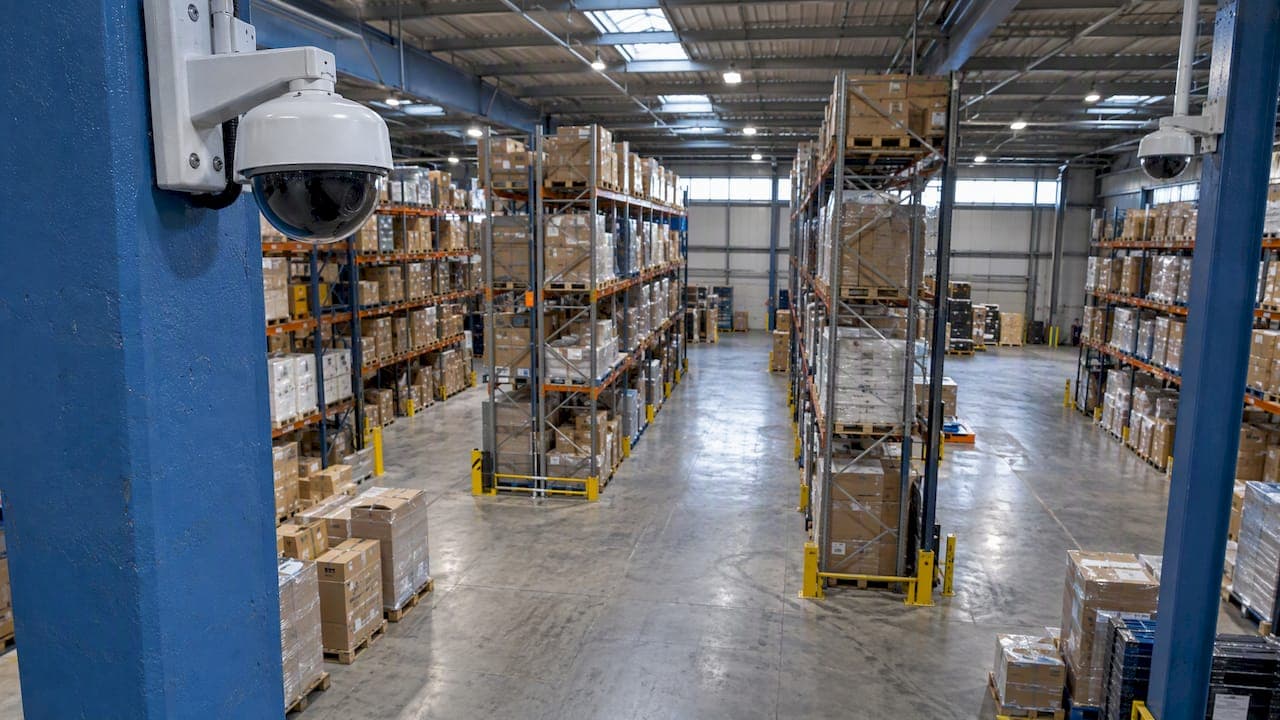
A good warehouse CCTV system is planned around how goods, vehicles and people move through the building, not around a camera count. Start with the yard, the loading bays, the entrances and the high-value storage. Add recording and monitoring that someone will actually act on. Then set up the data protection paperwork before the first camera goes live. This guide walks through each step, with the UK rules that apply.
We are Impact Security Systems. We design, install and certify CCTV for commercial sites across Liverpool and the North West, so this is written from the installer's side of the job.
TL;DR
- Plan coverage by risk and by flow: yard and gates, loading bays, internal aisles, high-value stock and staff entrances.
- Cameras must give images you can use. For logistics sites, TAPA guidance expects vehicles and people in external yards to be recognisable at all times.
- CCTV works best as part of a wider plan with alarms, access control and a clear response procedure, not as a stand-alone fix.
- If cameras record staff, you need a lawful basis, a risk assessment where needed, advance notice to workers, signage and a retention schedule.
- Ask your installer who designs, fits and certifies the system, and whether the same person is accountable at each stage.
Table of Contents
- What a warehouse CCTV system is for
- Start with a risk walk, not a camera list
- Where to put cameras
- Choosing the right cameras and recorders
- Monitoring, alarms and access control
- UK data protection and CCTV in a warehouse
- Our perspective
- What to ask an installer
- Temporary and construction-related warehouse sites
- CCTV for your warehouse from Impact Security Systems
- FAQ
- Sources
What a warehouse CCTV system is for
A warehouse system does more than record a break-in. In practice it does four jobs:
- Deters and detects. Visible cameras at the perimeter and loading doors make opportunistic theft less attractive. Detection tools alert someone when something happens out of hours.
- Gives evidence. Clear footage helps the police, your insurer and your own investigation.
- Records operations. TAPA notes that CCTV can clarify operational and logistical issues such as incorrect loading. Many operators find that disputed deliveries and damage claims are settled quickly once there is footage.
- Supports safety. Cameras can help cover blind spots around vehicles and pedestrians.
That last point needs care. The HSE's workplace transport guidance says CCTV can help with blind spots but should not replace driver vigilance or safe operating procedures. Treat cameras as an aid to your traffic management plan, not a substitute for it.
Police security advisers take a similar view of CCTV generally: it belongs inside a wider security plan, as a deterrent and an investigative tool rather than a universal solution. That is the right way to scope a warehouse project.
Start with a risk walk, not a camera list
Before anyone prices cameras, walk the site with the person who knows it best, usually the warehouse or operations manager. Note:
- Where goods enter and leave, and at what times.
- Which stock is most attractive or most expensive to lose.
- Where vehicles and pedestrians cross.
- Where past incidents happened: forced doors, cut fencing, shortages at despatch.
- Who is on site at night, and who would receive an alert.
- What lighting you already have, because poor lighting ruins image quality.
This list drives the design. Two warehouses of the same floor area can need very different systems. A single-tenant unit with a secure yard and night-time closure differs from a multi-occupancy estate with shared access.
Where to put cameras
Yard, gates and perimeter
The external yard is where vehicles, trailers and visitors arrive, and it is often where theft starts. TAPA's guidance for logistics facilities says CCTV must be able to view all traffic at external yards, with vehicles and individuals recognisable at all times. Even if you are not seeking TAPA certification, that is a useful design test.
In practice that means:
- A camera dedicated to reading vehicle registrations at the gate, positioned for the angle and speed of approach, rather than relying on a wide view to do everything.
- Overview cameras along fence lines and corners, with lighting or infrared capability suited to the site.
- Coverage of any trailer park or container storage.
If your site has a long or awkward perimeter, wireless links can reach places where running cable is impractical. Our haulage and agricultural wireless CCTV case study shows how that approach works on a spread-out site.
Loading bays and dock doors
Loading bays are where stock changes hands, so they are where shortages, damage and disputes arise. Aim for a view of each dock door and the goods as they pass through it, plus a wider view of the apron. Think about the sun's position and any glare from open doors, which can wash out faces and labels at certain times of day.

Position matters more than resolution here. A lower-spec camera at the right height and angle will out-perform a premium camera that looks down from too far away.
Storage aisles and high-value zones
In racking, you rarely need a camera in every aisle. Cover the aisle ends and cross-aisles, and add closer coverage on cages, pick faces for high-value lines and any returns or quarantine area. Remember that stacked pallets and forklifts change sight lines through the day, so check views with the warehouse as it normally looks, not on a quiet day.
Entrances, fire exits and offices
Cover every staff and visitor entrance, the reception or goods-in desk, and the fire exits. Government guidance for customs warehouse approvals is a good indication of what authorities expect to see on plans: site plans showing clearly marked entrances and fire exits, CCTV and security gates, alongside written procedures for goods entering and leaving. If you are applying for that kind of approval, your CCTV design should be drawn onto the same plan.
Choosing the right cameras and recorders
You will meet several camera styles in quotations. Rather than memorise a catalogue, match each to its task:
| Task | What to ask for |
|---|---|
| Reading vehicle plates at the gate | A camera set up specifically for number plate capture, with correct angle and lighting |
| Recognising people at doors and bays | Fixed cameras positioned at head height or just above, with a clear face-on view |
| Watching a wide yard or perimeter | Wide-angle or multi-sensor cameras, with low-light or infrared performance |
| Following activity live | A camera that can pan, tilt and zoom, used by a monitoring operator |
| Out-of-hours alerts | Cameras with motion or intrusion analytics tuned to ignore wildlife and weather |
Three design principles apply whichever models you choose:
- Specify the image, not the camera. State what you need to see (a face, a plate, a pallet label) and at what distance. A competent installer designs backwards from that.
- Plan storage honestly. Higher resolution, more cameras and longer retention all need more recorder capacity. Decide the retention period first, then size the recorder.
- Build in resilience. Think about what happens if power drops, if the network is interrupted or if a camera is knocked. Power backup and monitored health alerts are cheap compared with discovering a gap after an incident.
For standards, public sector planning conditions commonly ask for CCTV installed to BS EN 62676-4:2015, which covers application guidelines for video surveillance systems. Ask any installer whether their design follows it, and ask for the design and commissioning paperwork at handover.
Monitoring, alarms and access control
Recording tells you what happened. Monitoring and integration decide whether you can stop it.
Remote viewing. Managers can check live views and recorded clips from a phone or laptop. This is useful for multi-site operators, and it makes out-of-hours checks quick. If you operate several depots, it also helps to have them on a secure shared network. Guidance on connecting multiple sites covers the networking side of that.
Alarm integration. Cameras that trigger from an intruder alarm give whoever receives the alert a visual check on what is happening, rather than a bare zone number. Our commercial intruder alarms can be designed to work alongside CCTV on the same site.
Access control. Linking door and gate entry to camera views gives you a record of who entered, when, and what the camera saw at that moment. See our access control and door entry page for how that works for commercial premises.
Response procedure. Decide in writing who receives alerts, in what order they are called and what they do. A system that sends alerts to an unattended mailbox adds cost without adding protection. Police-response monitoring through an SSAIB or similarly certified route is a separate arrangement from CCTV alone, so ask your installer how each element is monitored.

UK data protection and CCTV in a warehouse
A warehouse camera that records staff, drivers or visitors processes personal data. That brings legal duties. The following is drawn from the ICO's guidance on monitoring workers.
Before you switch on
The ICO says employers must monitor workers lawfully and fairly, identify a lawful basis, consult workers or their representatives unless there is a good reason not to, and tell workers before monitoring begins. Where monitoring is likely to cause high risk to people, a data protection impact assessment (DPIA) is also required.
A sensible sequence is:
- Write down the purpose: theft prevention, health and safety, dispute resolution.
- Check that CCTV is a proportionate way to meet that purpose.
- Complete a DPIA where the guidance calls for one.
- Brief staff and any representatives before cameras go live.
- Confirm your registration and data protection policy cover the system.
Covert cameras are a special case. The ICO says covert monitoring is unlikely to be justified in usual circumstances, though it may be in exceptional ones. Take advice before considering it.
Signs, retention and access requests
- Signs. Put clear signs at the site entrance and around the perimeter stating that CCTV is in operation. Planning conditions for commercial sites often specify external warning signs all around the site. Internal signs near cameras help staff and visitors too.
- Retention. There is no fixed statutory period under UK GDPR. The ICO says retention must be justified by operational necessity, regularly reviewed and recorded in a retention schedule. Choose a period that matches how quickly you usually discover problems, such as stock counts or customer claims, and write down your reasoning.
- Subject access requests. Workers can ask for footage of themselves. The ICO expects systems to be designed so that retrieving such data is feasible. Ask your installer how to search and export by time and camera, and how to mask other people in a clip.
- Surveillance Camera Code. The Surveillance Camera Code of Practice applies to relevant authorities in England and Wales, and other operators are encouraged to adopt it voluntarily. Using its principles is a sound way to show you operate responsibly.
Also limit who can view and export footage, use individual logins, and keep the recorder in a locked room.
Our perspective
Most warehouse CCTV problems we are called in to fix were created at the design stage. Cameras went up where they were quick to fit, not where the incidents happen. Nobody checked what the image looks like at night, or who gets the alert at 2am.
That is why we believe the same engineer should survey the site, specify the system, install it and certify it. There are no salespeople passing a brief to a subcontractor, so the person who promised a clear view of your dock doors is the person who checks it is clear. We quote a fixed price after the survey, keep the installation tidy, and back it with aftercare and a 24-hour callout.
We also think CCTV should rarely stand alone. Tie it to the intruder alarm, door and gate control and a monitoring arrangement that fits your out-of-hours reality, and each part makes the others more useful. A warehouse run that way is harder to target and easier to manage.
Freddie
What to ask an installer
Use these questions to compare quotations like for like:
- Who surveys the site, and is it the same person who installs it?
- Is the work done by your own engineers or by subcontractors?
- What will each camera see, at what distance, by day and by night? Can you show me sample images or a design drawing?
- Which standard is the design based on, and what certification will I receive? You can see ours on our accreditations page.
- How long will footage be stored at the quality you propose, and what is the recorder's capacity?
- What happens during a power or network failure?
- How is the system maintained, and what is the response if a camera fails at night?
- Is the quotation fixed, and what does it include: cabling, lighting, signs, commissioning, training?
An installer who can answer these specifically is usually one who has done the work before. Vague answers on image quality and retention are the usual early warning.
Temporary and construction-related warehouse sites
Not every warehouse is a finished building. During fit-out, extension or construction of a unit, the site is exposed: materials, plant and open boundaries. A temporary compound system with its own power and connectivity can protect the works until the permanent system is commissioned. We have covered this in a temporary construction site CCTV case study and our construction sector page.
CCTV for your warehouse from Impact Security Systems
We design, install and SSAIB-certify CCTV and remote monitoring for commercial premises in Liverpool and the North West. Every system is specified and installed by the same experienced engineer, with no subcontractors, and quoted at a fixed price after a site survey. Remote viewing, app control and integration with alarms and access control can be included where your site needs them.

If you are planning a new system or want a second opinion on an existing one, see our CCTV and remote monitoring service or look at the wider commercial security range. Once the system is live, our service and maintenance options cover annual servicing and 24-hour callout.
FAQ
How many cameras does a warehouse need?
There is no standard number. It depends on the site's perimeter, the number of dock doors and entrances, the racking layout and what each camera must see. A survey against your risks gives a defensible count, and a fixed quotation then shows exactly what is included.
Do I have to tell staff about warehouse CCTV?
Yes. The ICO says employers must inform workers before monitoring begins and consult them or their representatives unless there is a good reason not to. You also need a lawful basis and, where the risk is high, a DPIA. Put up clear signs for visitors and drivers too.
How long should I keep warehouse CCTV footage?
The law sets no fixed period. You must be able to justify the period you choose by operational need, review it regularly and record it in a retention schedule. Think about how long it normally takes you to spot a theft, damage or a delivery dispute, and set storage to match.
Can warehouse CCTV be monitored remotely?
Yes. Modern systems allow live and recorded viewing from a phone or computer, and can be linked to alarms so an alert comes with a picture. Decide who receives alerts and what they do, so the monitoring leads to a response rather than just a notification.
Sources
- TAPA FSR CCTV Systems Guidance V2 (2024)
- HSE workplace transport safety guide HSG136
- Police security advice and CCTV conditions, planning file 2023/90576
- GOV.UK: applying to be approved as a warehousekeeper
- ICO: data protection and monitoring workers
- Surveillance Camera Code of Practice