
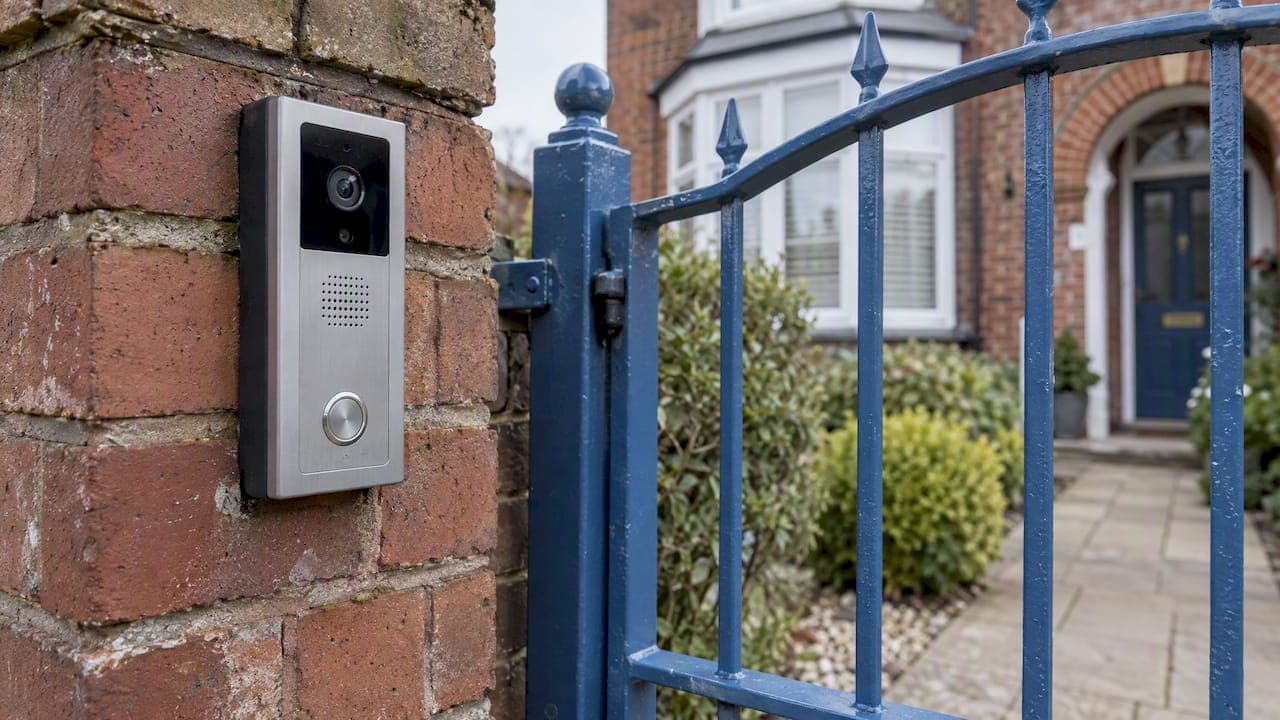
A wireless intercom lets someone at a door or gate speak to someone inside without a cable run between the two. That can mean a radio link, your Wi-Fi, or a mobile (GSM or 4G) connection, and each suits a different property. The right choice depends on distance, what is in the way, how you want to answer, and whether the door needs to open from the handset. This guide explains each type in plain terms, then shows what to ask for at a home, school, nursery, place of worship, office or building site.
TL;DR
- "Wireless" covers three different technologies: a dedicated radio link, Wi-Fi, and a mobile network (GSM or 4G). They behave very differently in range and reliability.
- Radio suits short gaps between a gate and a house. Wi-Fi suits homes with strong signal at the door. Mobile suits remote gates and sites with no usable network or cable.
- Video adds identification and a record of visitors, but it also brings data protection duties once your camera sees beyond your own boundary.
- A wireless intercom only controls a door if a lock release is wired to it, so plan the lock, power and fail-safe behaviour before you choose a handset.
- A site survey beats a brochure: walls, distance and power decide whether a system works day to day.
Table of Contents
- What a wireless intercom system is
- How wireless intercoms work, step by step
- The main types of wireless intercom
- Wireless door entry: how an intercom actually opens the door
- Wireless video intercoms: what video adds
- Range, reliability and power cuts
- Choosing by property: homes, schools, worship, business, sites
- Privacy and data protection with video intercoms
- Our view on wireless intercoms
- Intercoms from Impact Security Systems
- Questions people ask about wireless intercoms
- Sources
What a wireless intercom system is
A wireless intercom is a two-way voice system that links stations without physical cables between them. The microphone turns speech into an electrical signal, the system sends it by radio, Wi-Fi or Bluetooth, and the receiving unit decodes it and plays it through a speaker, as How Engineering Works explains.
The word "wireless" only describes the link between the stations. The door panel still needs power, and any electric lock or gate motor it controls still needs cabling. This is the most common misunderstanding we see: a wireless intercom removes the long cable between two points, but not every wire at the entrance.
Two terms matter when you compare products. Half-duplex means one person talks at a time, like a walkie-talkie. Full-duplex means both people can speak and listen at once, like a phone call. Clear-Com's wireless communications brochure draws the same distinction for two-way intercoms. For visitors at a front door, full-duplex is the one that feels natural.
How wireless intercoms work, step by step
Whatever the technology, the sequence at a front door is similar:
- A visitor presses the call button on the door station (the outdoor panel).
- The panel sends a call signal to the indoor monitor, handset or phone app.
- You answer. Audio, and on video models a picture, travels back and forth over the wireless link.
- If a release relay is fitted, you press a button and the lock or gate opens.
- The call ends after a set time or when you hang up, and the panel returns to standby.
The variations lie in step 2. A radio system talks directly between panel and handset. A Wi-Fi system goes through your router, so it depends on your broadband and signal. A mobile system uses a SIM in the door panel to ring a phone, so it works wherever there is signal, with no router involved.
The main types of wireless intercom
Most enquiries come down to choosing between these four. We include wired for comparison, because it is often the better answer and an honest survey will say so.
| Type | How it connects | Best for | Main limitation |
|---|---|---|---|
| Radio (digital RF or DECT) | Direct link between panel and handset | Gates and outbuildings a short distance from the house | Range falls with walls, metal and terrain |
| Wi-Fi | Your router and broadband | Homes and small offices with strong signal at the door | Depends on router, signal and broadband staying up |
| GSM / 4G | SIM card in the door panel calls a mobile or landline | Remote gates, farms, car parks, sites with no cable or Wi-Fi | Needs mobile signal and a SIM contract |
| Wired (for comparison) | Cable between panel and indoor unit | New builds, refurbishments, larger buildings | Cost and disruption of running cable |
Radio and DECT systems
Wireless intercoms commonly communicate by radio waves using frequencies such as 900 MHz or 2.4 GHz, according to the Wireless intercom overview on Wikipedia. DECT is a European cordless standard developed by ETSI, and unlicensed European DECT systems may operate in the 1880 to 1900 MHz band, per Clear-Com's DECT technical guide. In practice, DECT-style links are the same family as a cordless home phone: reliable over short distances, with little to configure.
Wi-Fi intercoms
Wi-Fi video intercoms and smart doorbells send audio and video through your network to a phone app or a monitor. They are cheap to start with, and you can answer from anywhere with internet. The catch is that the door panel sits at the edge of your property, often where signal is weakest. A good Wi-Fi intercom depends on a good Wi-Fi design. It is one reason we also install Wi-Fi and networking alongside intercoms rather than treating them as separate jobs.
GSM and 4G intercoms
A GSM or 4G intercom has a SIM in the panel and dials a mobile when the button is pressed. There is no indoor unit to power and no cable to lay, which makes it popular for gated yards, farm entrances and unattended sites. Two checks are worth making before buying. First, confirm the unit works on current networks, because older 2G and 3G-only units have been overtaken by network switch-offs. Second, check the running cost of the SIM, which is a recurring charge rather than a one-off purchase.
Landline-based systems and the 2027 switch
Some older door entry systems dial out over a telephone line. By January 2027, UK landline services are due to move to a fully digital network, with the old PSTN withdrawn, according to the House of Commons Library. If your gate or door entry still relies on an analogue line, ask whether it will keep working once your line moves to broadband voice. A SIM-based or IP-based replacement is often the simplest fix.
Wireless door entry: how an intercom actually opens the door
People searching for wireless door entry usually want one thing: to see who is there and let them in without walking to the door. That needs three parts working together:
- The intercom panel, which handles the call and sends the "open" command.
- A release relay inside or beside the panel, which switches the lock or gate motor on command.
- The lock itself, such as an electric strike, a magnetic lock or a gate operator, with its own power supply.
The open command can travel wirelessly, but the lock needs power. Usually that means a low-voltage cable from a power supply to the door. If the door is far from any supply, a battery-powered lock or a mains feed run by an electrician is the alternative.
There is also a choice about fail behaviour. A magnetic lock releases when power is lost, which is good for fire escape routes but can leave a door unsecured in a power cut. An electric strike can be set to hold locked. For doors that people may need to leave quickly, your fire risk assessment decides, not the intercom brochure.
Where a building needs more than a button and a latch, such as named users, fobs, schedules and an audit trail of who came in, intercoms become one part of a wider access control and door entry design. A small shop might only need the intercom. A school or office with 100 staff almost certainly needs both.
Wireless video intercoms: what video adds
An audio-only intercom tells you someone is there. A video intercom shows you who, which matters for three reasons:
- Identification. You can confirm a delivery, a contractor or a stranger before you speak.
- Deterrence and evidence. Many units capture a snapshot or clip of each caller, which helps if a visit later becomes an issue.
- Accessibility. A visual call helps people who are deaf or hard of hearing, and some systems add an induction loop for hearing aid users. Ask for this at specification, since it is rarely default.
What to check on any video model: night vision (infrared or white light), field of view wide enough to cover the step and the person, a camera angle that does not look straight into low sun, and whether footage is stored on the device, a card or the cloud. If you want a doorbell that is part of a bigger system, see how smart doorbells and intercoms link with home CCTV and alarms.
Range, reliability and power cuts
Manufacturers quote open-air range, which you will not get. Real range is set by what is between the two units.
- Thick stone or brick walls, foil-backed insulation and metal gates all weaken radio and Wi-Fi signals. Older Liverpool terraces and converted buildings with solid walls are a common problem.
- Distance is not linear. A unit that works at 30 metres in a garden may fail at 15 metres through two internal walls.
- Interference from other 2.4 GHz devices, such as routers and baby monitors, can cause crackle and dropped calls on 2.4 GHz systems.
- Mobile signal varies by network and by spot. Test with a phone from the actual mounting position, on several networks, before you commit to a SIM-based panel.
Power and network outages need planning rather than hope:
- A Wi-Fi intercom stops working when the router loses power or broadband drops, unless the router is on a small battery backup.
- A radio handset usually runs on a rechargeable battery, so it can survive a short outage, but the door panel and lock still need power.
- A GSM panel keeps working if your home broadband is down, but it needs its own power or battery backup and mobile coverage.
- Doors on a fire route need a defined behaviour in a power cut. This should be a decision made at design stage.
After installation, test each system as you would use it: call from the panel at the weakest point, answer in the room furthest away, release the lock, and then cut the router power to see what happens.
Choosing by property: homes, schools, worship, business, sites
Homes
For a house with a drive or gate, the key questions are distance and signal at the entrance. A short radio link or Wi-Fi video unit is often enough. A long drive, or a gate beyond mobile and Wi-Fi reach, points to GSM or a wired link run once at installation. Think about who needs to answer: one handset in the kitchen, or apps on several phones. A new build is the cheapest time to put cable in, as our Cheshire new-build residential case study shows.
Schools and nurseries
For a school or nursery, the intercom is a safeguarding control. Visitors should be seen and identified before the door opens, the reception should be able to release the door, and the system should keep working predictably. Wi-Fi alone is rarely the right foundation here. A school generally wants a wired or well-designed IP network behind the main entrance, with video, a door release and ideally integration with fobs for staff. Many schools also consider lockdown systems as part of the same entrance and alerting design.
Places of worship
Churches, mosques, temples and community halls often have thick walls, several entrances and volunteer key-holders. That makes radio and Wi-Fi coverage patchy, and it makes shared fobs a headache. A mix of a video intercom at the main door and access control on side doors, with permissions that can be changed without changing locks, tends to work best. The system needs to be simple enough for a rota of volunteers to use without training.
Offices, shops and leisure venues
Businesses usually want video, a release from reception, out-of-hours diversion to a mobile, and logging. Our leisure and public sector work gives a sense of how entrances are handled where staff and public mix. Many businesses also pair the intercom with an intruder alarm, so the last person out can set the system and the entrance stays secured.
Construction and temporary sites
A site compound has no cabling, changing layouts and often no mains. This is where wireless and 4G genuinely lead: a battery or solar-powered panel with a SIM can be moved as the site changes. Our construction sector page and temporary compound CCTV case study show how mobile connectivity is used where there is no fixed infrastructure.

Privacy and data protection with video intercoms
A video intercom is a camera, and a camera brings legal duties. For a home, the government's domestic CCTV guidance says GDPR and the Data Protection Act 2018 apply if your system captures images beyond your own property. You must use it responsibly, keep recordings secure and delete them when no longer needed. In practice, angle the camera at your own step and path, and mask or crop areas that show the pavement or a neighbour's door where the product allows it.
For a business, school or nursery, the bar is higher. A summary of the ICO's guidance for businesses, from law firm Wiggin, says to collect only what is needed, delete it afterwards, apply effective security controls and give clear signage in public areas. It also notes that processing criminal-offence data calls for a data protection impact assessment and an appropriate policy document. If your intercom records footage, name who is responsible for it and how long it is kept before you switch it on. For a specific school, nursery or business, your data protection lead or the ICO's own guidance is the right place to confirm what applies to you.
Our view on wireless intercoms
We install intercoms every week, and we are cautious about the word "wireless". It sells well, but the real question is where the weak point of the system will be. In our experience it is rarely the handset. It is the signal at the door, the power to the lock, or a router nobody thought about.
So we start from the entrance and not from the product. We visit, measure the distance, test the signal at the exact mounting position, check how the door is secured and what happens if power fails, and then specify. Sometimes that is a Wi-Fi video unit. Sometimes it is a GSM panel on a remote gate. Sometimes the honest answer is to run one cable and avoid ongoing problems. We do not think any one technology wins.

The second point is accountability. The engineer who surveys your property is the engineer who specifies, installs and certifies the system. There are no subcontractors and no salesperson passing a brief along. If something does not work, there is one person to call, and one person who knows why it was designed that way. Our accreditations page covers our SSAIB certification.
Finally, treat the intercom as part of the whole security picture. It sits alongside CCTV, alarms and access control, and works best when it is designed with them. A tidy installation, a fixed quotation up front and proper aftercare matter as much as the handset.
— the author
Intercoms from Impact Security Systems
We design, install and certify intercom systems for homes, schools, places of worship and businesses across Liverpool and the North West, with audio and video options, remote answering from a phone and links to door release and access control. Every system is installed directly by a qualified engineer, and every job starts with a site survey and a fixed quotation.

See our intercom systems page for commercial entrances, or our home security page for houses. If you already have a system that is unreliable, we also offer servicing and maintenance, including takeovers of existing installations.
Questions people ask about wireless intercoms
Do wireless intercoms need electricity?
Yes. The door panel needs power from the mains, a low-voltage supply or a battery, and so does any lock or gate it controls. Handsets usually have rechargeable batteries. Wireless only removes the cable that carries the voice or video between units.
Can a wireless intercom open a gate or door?
Yes, if a release relay is fitted and connected to the lock or gate motor. The panel sends the open command when you press a button on the handset or app. Budget Wi-Fi doorbells often lack this, so check it before buying.
Which is better for a remote gate: Wi-Fi or GSM?
Usually GSM or 4G, because Wi-Fi rarely reaches a distant gate reliably. A SIM-based panel calls your phone directly and does not rely on your router. Test the mobile signal at the gate first, and allow for the SIM's running cost.
Will my intercom still work when landlines go digital?
If it connects through an analogue telephone line, it may need changing. UK landlines are due to move to a digital network by January 2027, so ask your installer to check whether yours depends on the old line. Radio, Wi-Fi and SIM-based systems are not affected in the same way.
Do I need to register or tell anyone about a video intercom?
If the camera only sees your own property, domestic rules are light. If it captures public areas or neighbours, data protection law applies, and businesses, schools and nurseries have further duties such as signage and retention limits. Check the ICO's guidance for your situation.
Sources
- What is a wireless intercom system and how does it work? (How Engineering Works)
- Wireless Communications brochure (Clear-Com)
- Wireless intercom (Wikipedia)
- Digital Enhanced Cordless Telecommunications technical guide (Clear-Com)
- The switch to digital landlines (House of Commons Library)
- Guidance on the use of domestic CCTV (GOV.UK)
- Personal Data and Preventing Crime: ICO guidance for businesses (Wiggin)